
Case file PRJ_005
Style & Token Scanner
A free Figma plugin that shows how much of a file is tokenized, finds raw values and fixes them in one click

Style & Token Scanner is a free Figma plugin that answers one question: how much of this file is actually tokenized? It scans colors, radius, spacing and font sizes on a page or a selection, shows which values are linked to a variable or style and which are still raw, and lets you move a whole group onto one binding in a single click. I wrote the PRD, designed it, built it with Claude, tested it in Figma and shipped it to Figma Community on my own.
Product team
- 1 Product Designer (me) — PRD, design, build, test, release
- Claude as AI pair — code for the plugin logic and UI
One scan: 67% tokenized, split by Color, Radius, Spacing and Text, with every "No Link" value listed
§ 01Background / Context
A student in my UX Foundation class asked if there was a plugin that could scan a file's text styles and color tokens. I looked. The ones I found either didn't do quite this, or were paid. I also tried asking Figma's built-in agent, and the result wasn't good enough to rely on.
So I did what I tell my students to do: write the problem down properly first. I wrote a short PRD, then built the plugin with Claude. The backstory is in my essay AI sẽ đi nhanh, ai sẽ đi chậm?. This case study covers the product side: what problem it solves, what I decided, and where it got stuck.
§ 02User pain points & needs
The target user is a designer or design system owner cleaning up a file that has already passed through several hands. The file "has a design system": variables exist, styles exist. But click one button and its fill is #0D99FF linked to color/brand/primary. Click the button next to it and it's the same #0D99FF, typed by hand. They look identical. Some 16px paddings use space/16, some don't. Somewhere there's a 15px font size nobody remembers adding.
The real problem isn't that the file is messy. It's that nobody knows how messy it is.
- No number. There's no way to say "this file is 67% tokenized", so there's no baseline and no progress.
- No way to find things. You can't easily locate the 9 layers using the brand color without a link.
- Fixing is manual. Re-linking means clicking layer by layer and assigning the token again.
From this, the PRD settled on three jobs and nothing more: see it (what %), find it (which layers), fix it (the whole group in one action).
§ 03How might we / Design challenges
- HMW give designers a single, trustworthy number for how tokenized a file is?
- HMW help them jump straight to every layer that uses a raw value?
- HMW let them fix a whole group at once, without being afraid the canvas will change?
The part of the PRD I spent the most time on wasn't the feature list. It was "Out of scope".
- No creating new tokens. The plugin only merges toward tokens that already appear on that same value.
- No scanning everything. Only SOLID fills and strokes, corner radius, auto-layout spacing and font size. Shadows, gradients, stroke weight and dimensions are left for later.
- Merge changes the binding, never the value. Merging on the
color/brand/primaryrow links the 9 hand-typed#0D99FFlayers to that token; the color stays#0D99FF. The plugin never "helpfully" turns 15 into 16. Nothing on the canvas moves a pixel, so people can click Merge without worrying about it. - Fully offline. The manifest sets
networkAccess: none. The plugin reads your whole file, and many files belong to clients, so I didn't want any request leaving the machine. The cost is that the UI has to be self-contained; even the empty-state image is embedded in the HTML as base64.
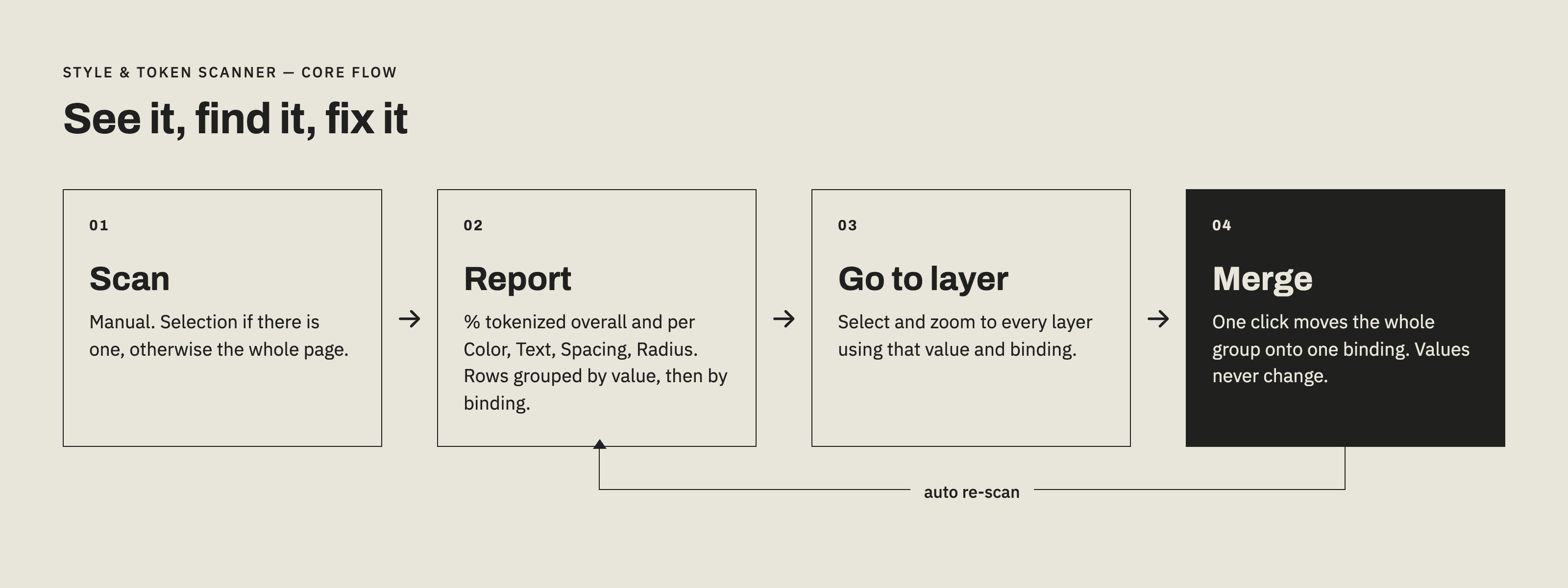
The core flow: Scan, Report, Go to layer, Merge, then an automatic re-scan
§ 04Tech & AI involvement
The plugin is deliberately simple: one code.ts file with no bundler talks to one ui.html (vanilla HTML/CSS/JS) through postMessage. It uses Figma's dynamic-page document access, so every lookup is async, and it also recognizes tokens coming from a team library. The UI is 440×680 and follows Figma's theme.
I wrote the PRD; Claude wrote the logic and the UI. But there was one clear limit: Claude can't run Figma. To know whether something worked, I had to import the plugin into Figma desktop, click through it myself, look at the result, then describe what was wrong so Claude could fix it.
The longer a vibe-coding project runs, the more the AI "forgets". I kept a CLAUDE.md file with the architecture, the decisions already made, and the things I had removed ("no token-picker modal", "no selectionchange listener"). Every new session, Claude read that file first instead of re-guessing from the code.
§ 05Build and ship
Manual scan instead of auto-scan
The first version scanned automatically whenever the selection changed. It sounded convenient until I tried it in Figma.
Drag-selecting an area fires a burst of selection events, and scans started piling on top of each other. I had Claude add a lock: if a request comes in mid-scan, remember it and run exactly one more scan afterwards.
The second bug was funnier. "Go to layer" selects every layer using a value and zooms to them. But selecting layers is a selection change, so the plugin thought you'd picked a new area and shrank the scan scope to those few layers. You'd be reviewing a whole page, click one button, and the report would collapse to a handful of layers.
In the end I dropped auto-scan entirely. You press Scan; the scope is whatever is selected at that moment (or the full page if nothing is); selections made by the plugin itself don't count. Less "smart", much more predictable.
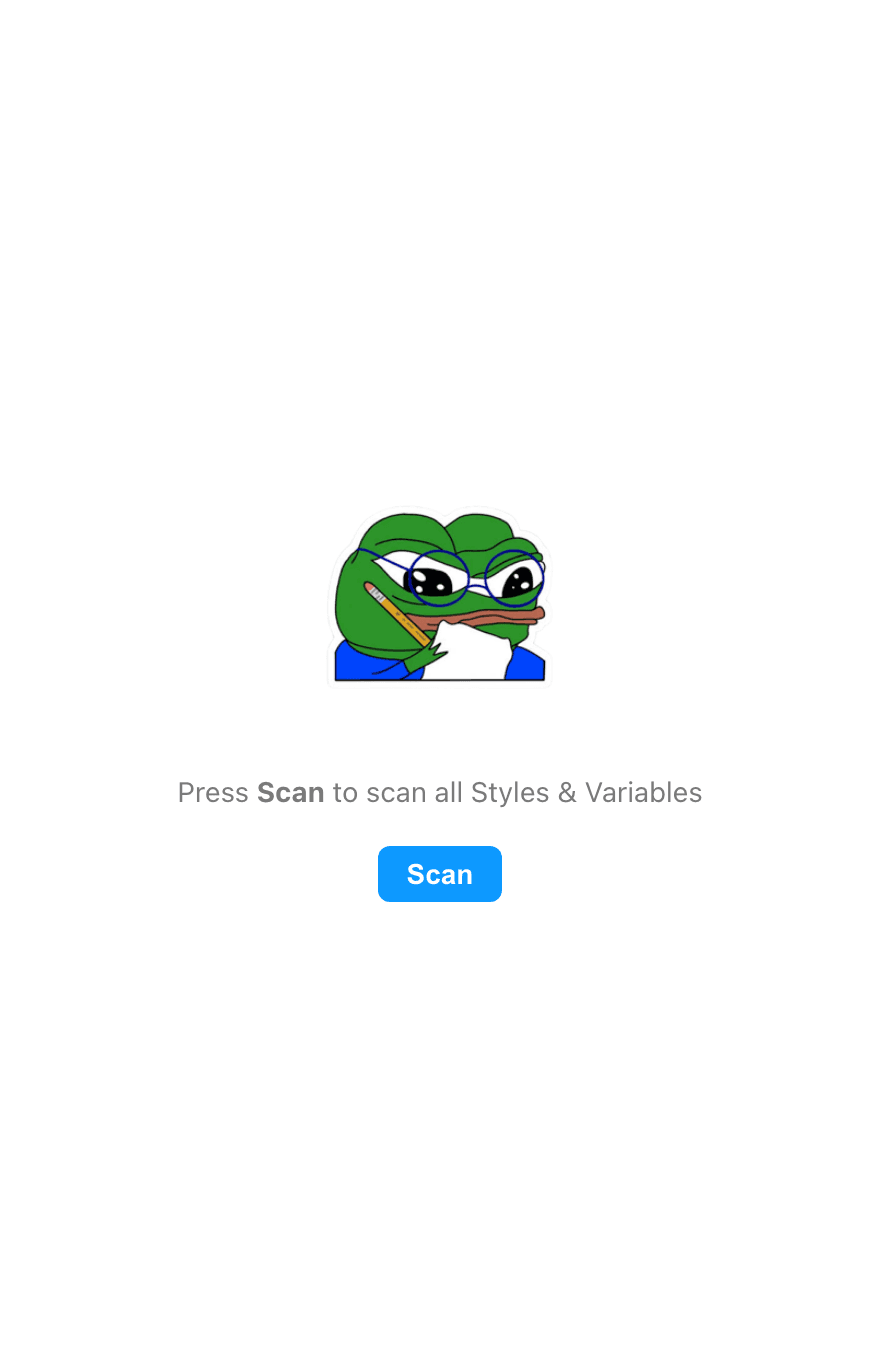
Nothing happens until you press Scan
Cutting to ship
The git history shows the first commit on 9 July 2026. A second commit the same day removed roughly 245 lines: the token-picker modal. Using it, I found it redundant: when a value has mixed bindings, the right answer is almost always already sitting in that value. Now Merge only appears when a value has more than one binding, and whichever row you merge from, the whole group follows that row. Merging from the "No Link" row unlinks the group and keeps the value.
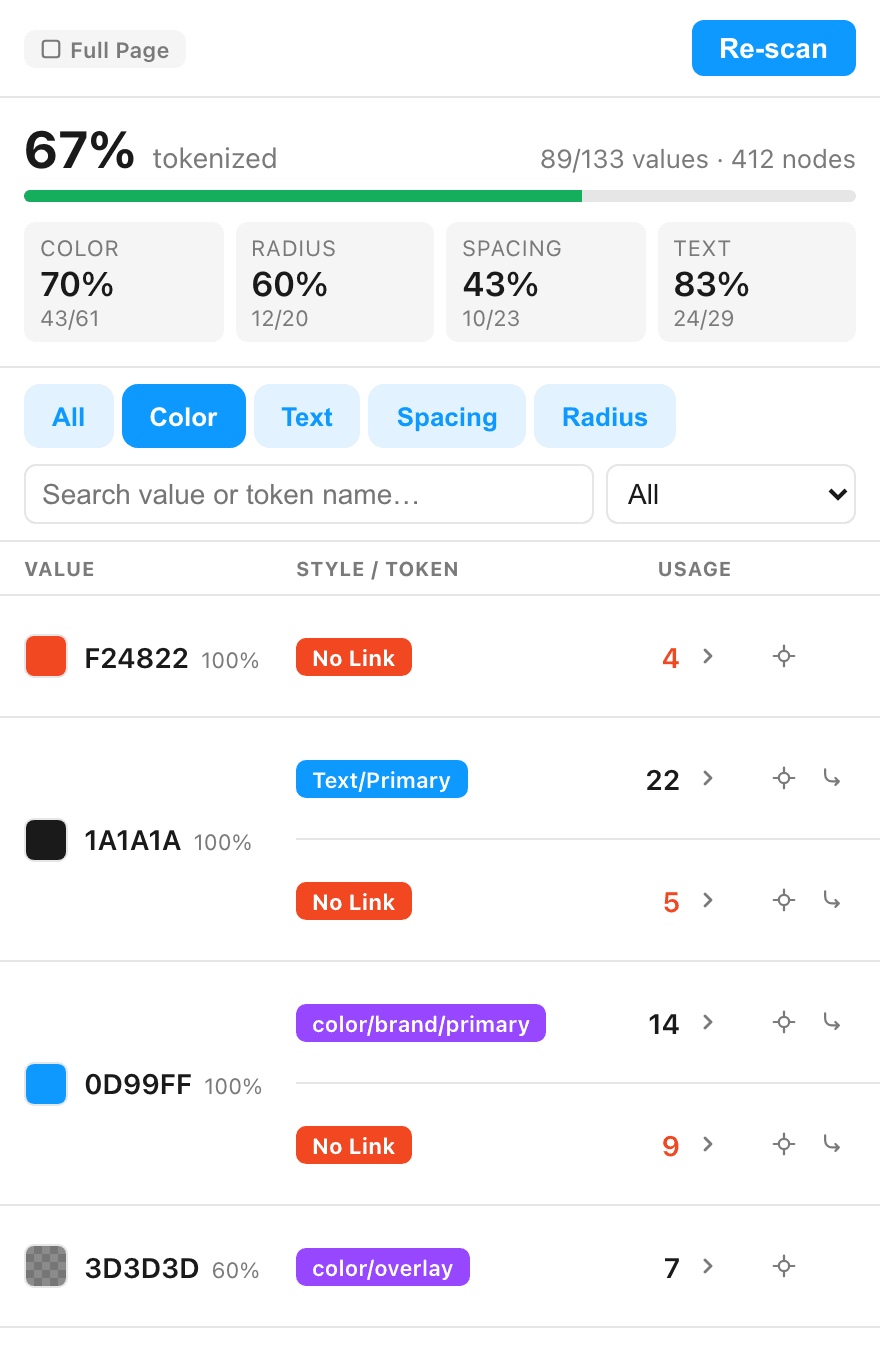
Same brand color: 14 layers linked to color/brand/primary, 9 typed by hand
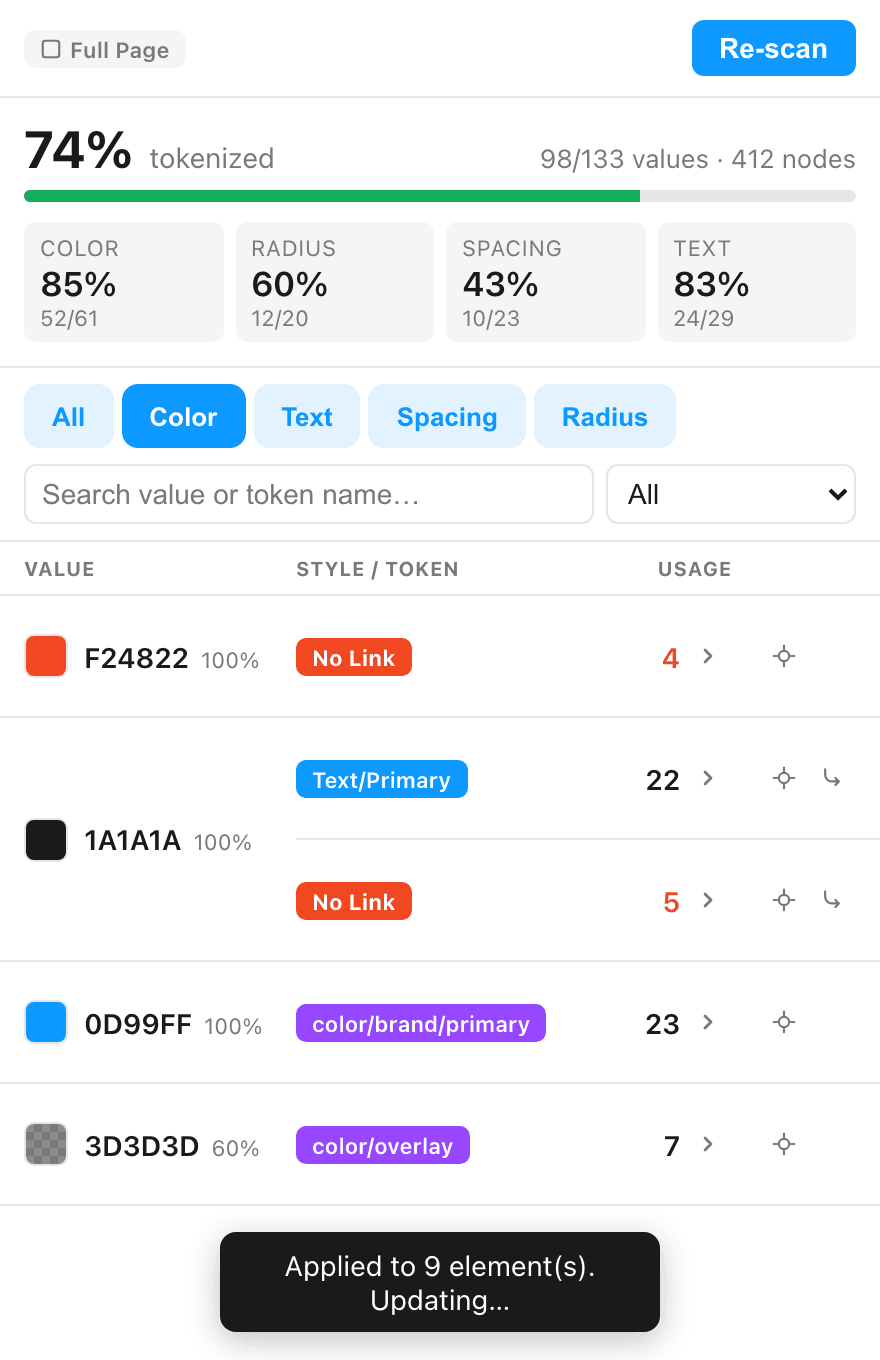
After merging from the token row, all 23 layers share one binding and the plugin re-scans on its own
Grouping by property
On 21 July I changed what you see when you expand a row. Instead of a list of frame names, usage is grouped by Fill/Stroke for colors and Gap/Padding for spacing. When you're cleaning a file, "is this 16 a padding or a gap?" matters more than a layer name.
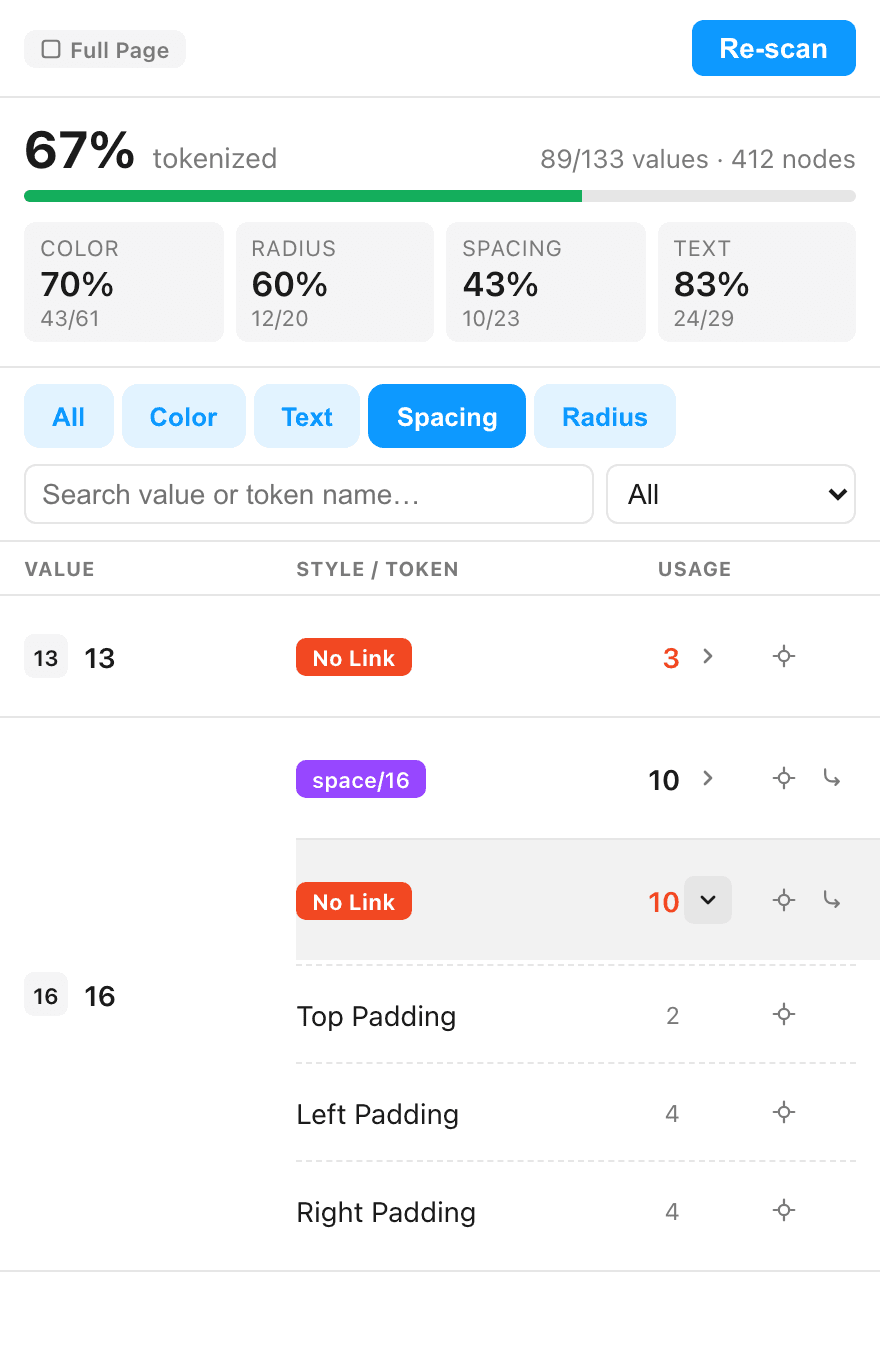
Where the unlinked spacing 16 lives: padding, not gap
§ 06Test
I tested every build by hand in Figma desktop. Some bugs only showed up when I looked with my own eyes:
- 12 and 12.0000001 were split into two groups. Figma stores some numbers with floating-point noise, so values have to be rounded before grouping.
- One layer counted twice. A layer using the same color for fill and stroke showed a usage of 2, but "Go to layer" could only select 1 layer. Usage now counts layers, not occurrences.
There was no formal usability study. The scan-scope bugs above were the closest thing to one, and they changed the product more than any feature did.
§ 07Release
Style & Token Scanner is live on Figma Community, free: Style & Token Scanner, released in July 2026.
The PRD defines success as the tokenization % going up after a session, and the number of "partial" groups (values with mixed bindings) going down. I don't have tracking in place for either yet, so I can't report results.
Open questions for a next version: extend scanning to stroke weight and effects, or suggest the nearest existing token for a raw value.
Looking back, the hard part wasn't the code. Claude handled that. The hard part was deciding what not to build, and clicking through enough times to see where "smart" turned into annoying. You can only clean up what you can measure.
End of file PRJ_005