
Case file PRJ_006
Easy Tag
A free Figma plugin that tags icon components by meaning, in English or Vietnamese, offline and no AI.

Easy Tag is a free Figma plugin that writes up to 5 descriptive tags into the description of each icon component, so designers can find icons in the Assets panel by meaning, in English or Vietnamese. I wrote the PRD, designed it, built it with Claude, tested it on a real icon set and shipped it to Figma Community in July 2026.
Product team
- 1 Product Designer (me) — PRD, design, build, test, release
- Claude as AI pair — logic, UI code and the Vietnamese dictionary, from my PRD
Search "back" in the Assets panel and the icons show up, because Easy Tag wrote the tags into their descriptions
§ 01Background / Context
Figma's Assets panel searches only two things: the component name and its description.
Names usually describe the shape: arrow-left, chevron-down. People searching think in terms of function: "back", "close", "undo". Descriptions could bridge that gap, but in almost every icon library they're empty. Writing them by hand for hundreds of icons takes hours, and every person writes them differently.
Vietnamese teams have one more layer. Many designers think and search in Vietnamese, while the icon set is named in English. Type "back" or "quay lại" into the Assets panel and nothing shows up, even though icon/arrow-left is right there.
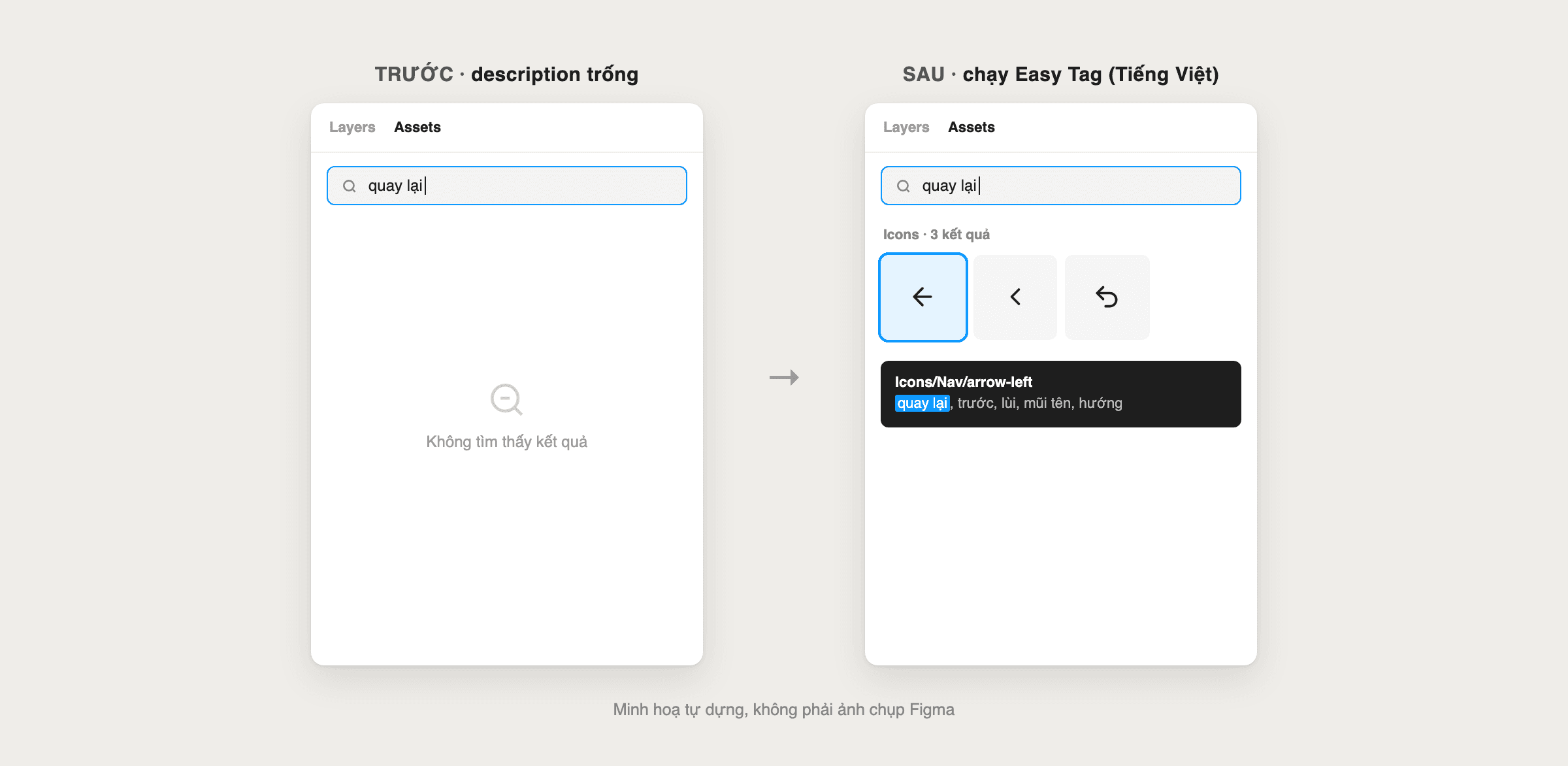
An illustration I made, not a Figma screenshot. The same "quay lại" (back) search returns nothing before, and arrow-left, chevron-left and undo after running Easy Tag.
This was my second Figma plugin, after Style & Token Scanner. I used the same workflow: write a short PRD first, then build with Claude.
§ 02User pain points & needs
The plugin is for designers and design system maintainers who look after large icon libraries, especially Vietnamese teams.
Pain points
- Icons can only be found if you remember the exact name the author picked.
- Writing descriptions by hand doesn't scale to hundreds of icons, and the results are inconsistent.
- Vietnamese speakers can't search an English-named library in their own language.
- Some teams name icons in Vietnamese, with diacritics (
giỏ hàng) or without (gio-hang), and tools don't treat those as the same thing. - AI tagging tools need an API key, paid credits and a connection. Freelancers, students and small teams can't always pay for another subscription.
Needs
- Tag a whole icon set in one click.
- Find icons by meaning, not by exact name.
- Bilingual both ways: English or Vietnamese names in, English or Vietnamese tags out.
- Works offline by default, free, no account or key.
§ 03How might we / Design challenges
- HMW let designers find an icon by what it does, not by what someone named it?
- HMW tag hundreds of components in one action without manual writing?
- HMW support Vietnamese properly, including names typed without diacritics?
- HMW keep it free and offline-first, with no AI and no API key?
Scope for v1
The PRD set a 4-step flow: select components, pick a language, click Generate, review the results. Just as important was what v1 would not do: no FigJam or Slides, no third language, no AI-generated tags, no layers that aren't components.
§ 04Tech & AI involvement
Why no AI in the product
It sounds backwards to build with AI and then leave AI out of the product. But calling a model to generate tags means every user needs an API key, pays per call and waits on the network. The people who need this plugin most are the ones I wrote about in AI sẽ đi nhanh, ai sẽ đi chậm? ("Who moves fast with AI, who gets left behind?"): not everyone has budget for one more subscription. A curated dictionary does this job well enough, for free.
How it works
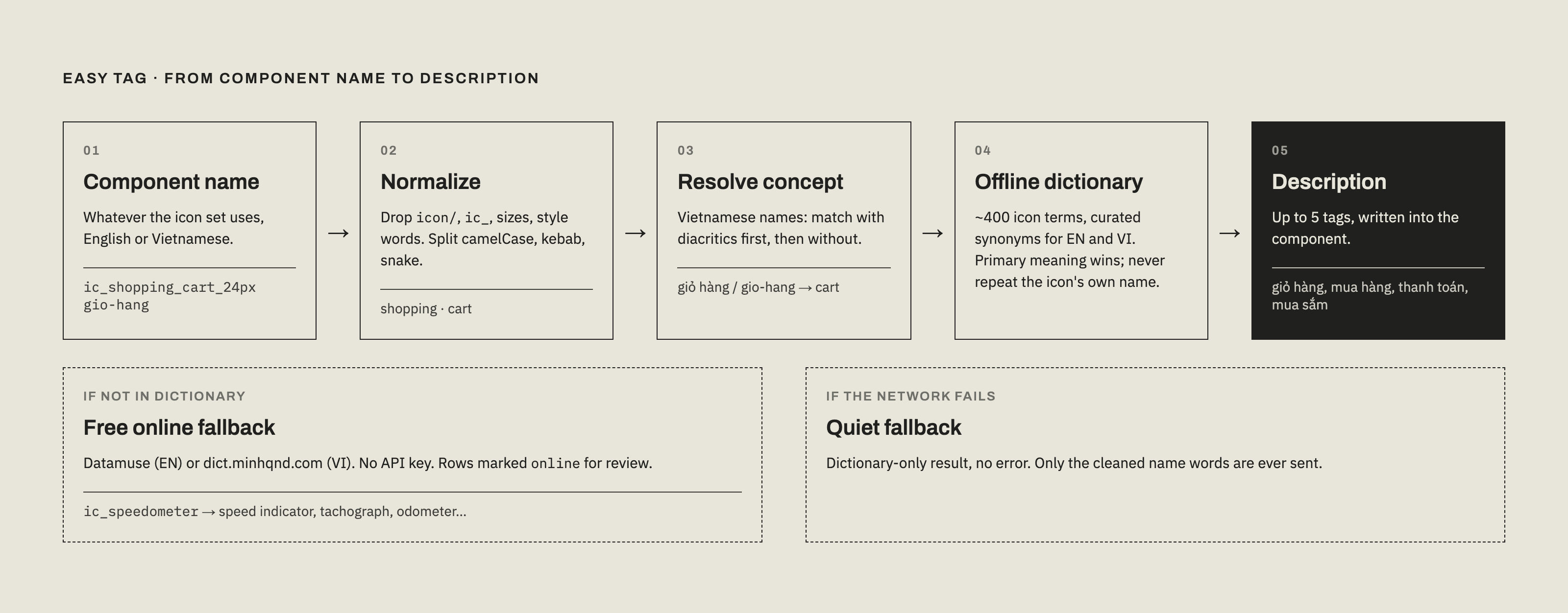
From component name to description: normalize, resolve the concept, look it up in the offline dictionary, fall back to a free online source only when needed.
- Normalize the name. Strip
icon/,ic_, sizes like24pxand style words likefilledoroutline. Split camelCase, kebab-case and snake_case.Icons/Nav/arrow-leftandic_shopping_cart_24pxboth come down to the actual icon words. - Offline dictionary first. About 400 common icon terms and compounds, each with its own curated English and Vietnamese synonyms.
- Free online fallback. If a name isn't in the dictionary, the plugin looks it up via Datamuse (English) or dict.minhqnd.com (Vietnamese). Neither needs signup or a key.
ic_speedometerreturns "speed indicator, tachograph, odometer…" from Datamuse. - Privacy. The manifest allows exactly those two domains, and only the cleaned name words are sent.
Where Claude helped
Claude wrote the logic and UI from my PRD. I also had Claude write the Vietnamese dictionary, with one strict instruction: translate the icon's concept in a product UI, not the word. So "cart" becomes "giỏ hàng" (shopping cart), not a literal supermarket trolley, and bell-off becomes "tắt thông báo, im lặng, không làm phiền" (notifications off, silent, do not disturb).
§ 05Build and ship
The interface
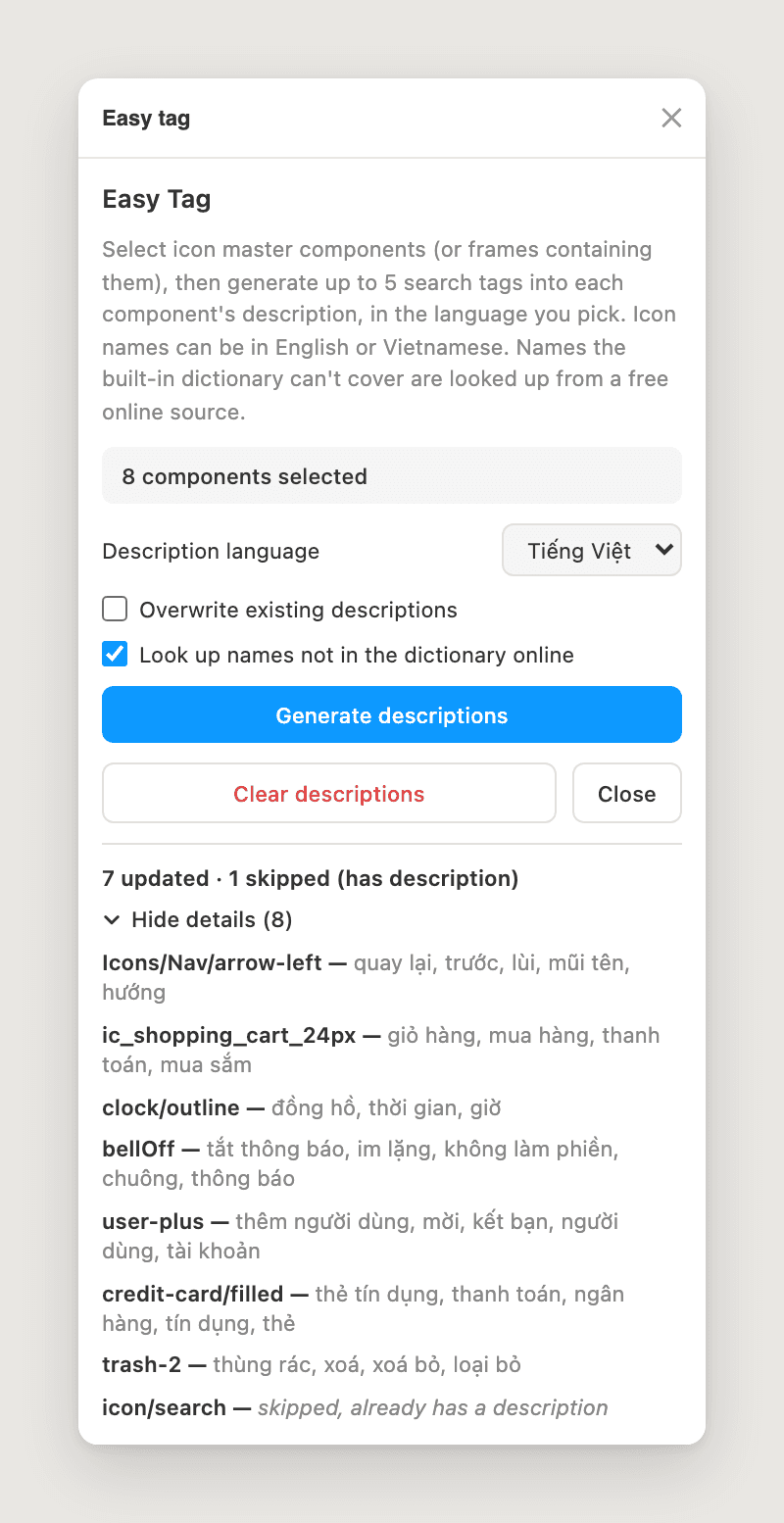
The real plugin UI (rendered from ui.html with sample data), generating Vietnamese tags. Components that already have a description are skipped unless Overwrite is ticked.
I kept the UI to a single panel:
- Selection count, with component sets and frames searched recursively
- Description language: English or Tiếng Việt
- Overwrite existing descriptions, off by default so hand-written work isn't lost
- Look up names not in the dictionary online, on by default, untick to stay fully offline
- Generate descriptions and Clear descriptions
- A results list per component, so every change is visible
Making Vietnamese work
English was the easy part. Vietnamese needed three decisions:
- Vietnamese input names.
giỏ hàngandgio-hangshould both resolve to the cart concept, then produce tags in whichever output language was picked. - Diacritics first. "giỏ" means basket and "giờ" means hour. Without diacritics, both become "gio". So the plugin matches with diacritics first, and only falls back to a diacritic-free match if that fails.
- An accepted trade-off. A component named just
gio, with no diacritics, resolves to "gió" (wind) and gets weather tags. I kept it, because people who skip diacritics usually write the full phrase, likegio-hang, and the phrase still resolves correctly.
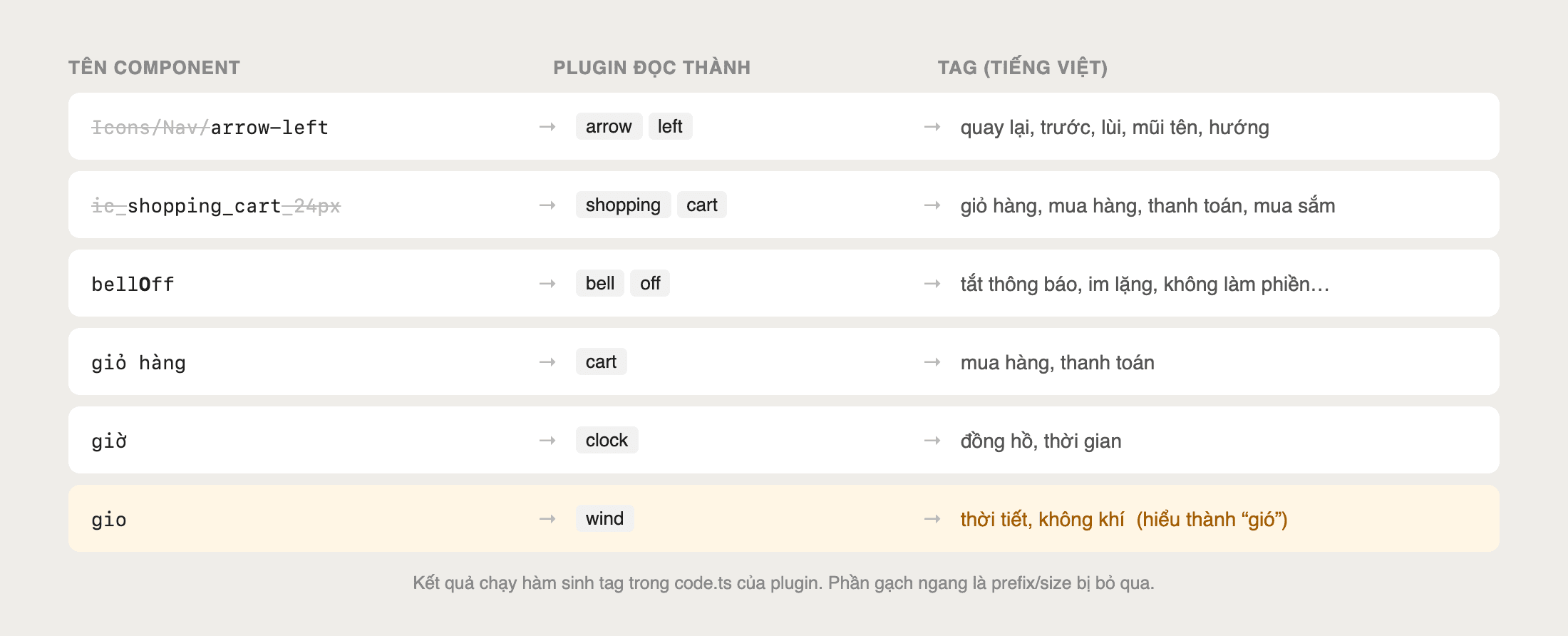
Real output from the plugin's tag function. Left: the component name, with ignored prefixes and sizes struck through. Middle: the concept it resolves to. Right: the Vietnamese tags. The highlighted last row is the "gio" → wind trade-off.
§ 06Test
I tested the plugin in Figma on a real icon set, not just sample names. A few rules only showed up that way:
- Primary meaning wins. Some words belong to several concepts. "báo cáo" is the main meaning of report and also a secondary tag of the flag icon, so the primary meaning has to take priority.
- Never reuse the icon's own name. An icon called "giỏ hàng" with "giỏ hàng" in its description adds nothing to search, so the name is always excluded from its own tags.
- Make online tags visible. Free sources vary in quality, so any row filled from an online lookup gets an
onlinelabel to review. - Fail quietly. If the network fails, the plugin falls back to the dictionary without showing an error. Names it can't understand at all, like a component named just "Icon", are reported as "no tags found".
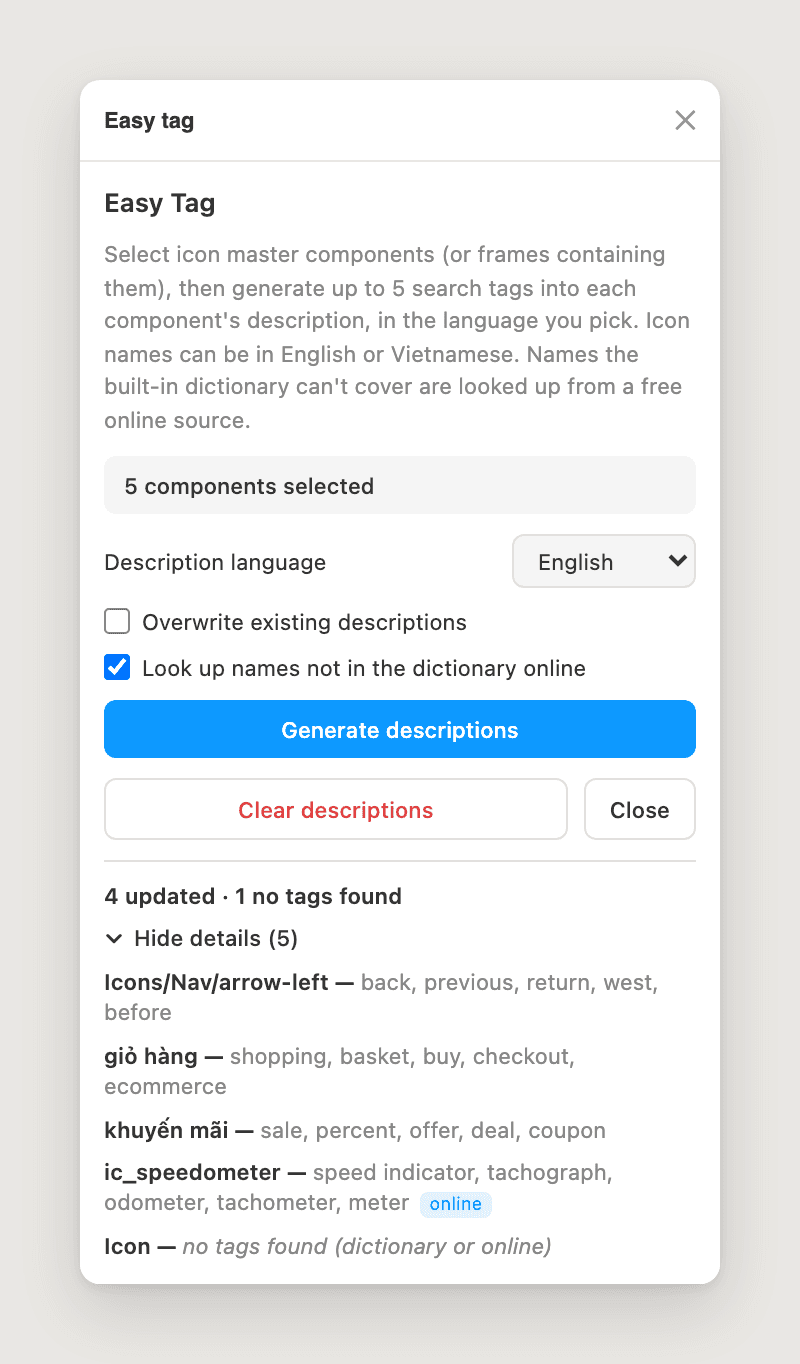
English output: a Vietnamese name (giỏ hàng, khuyến mãi = promotion) still produces English tags, ic_speedometer is filled online and labelled, and a component named just "Icon" gets no tags.
§ 07Release
Easy Tag is published free on Figma Community: Easy Tag. It went from first commit (July 13, 2026) to Community release within the same month.
Success signal
The intended signals are that a whole icon set gets tagged in one click, and that icons can be found by meaning in either language. I don't have usage tracking in place yet, so I can't report numbers.
What's next
- Grow the dictionary
- Add more languages
- Preview and edit tags before they're written
Learnings
- The hard part of a small tool usually isn't the code. AI can handle that. The hard part is knowing exactly where the friction is, and what to leave out of scope.
- I left AI out of the product not because AI is bad, but because a 400-word dictionary does the job, and users shouldn't have to pay for that.
End of file PRJ_006